Your plan set, on every phone on the job.
The Synhelm blueprint reader turns a PDF plan set into sheets anyone on the job can open, zoom and mark up, with revisions and a compare view. It lives on the job, next to the hours, photos and paper.
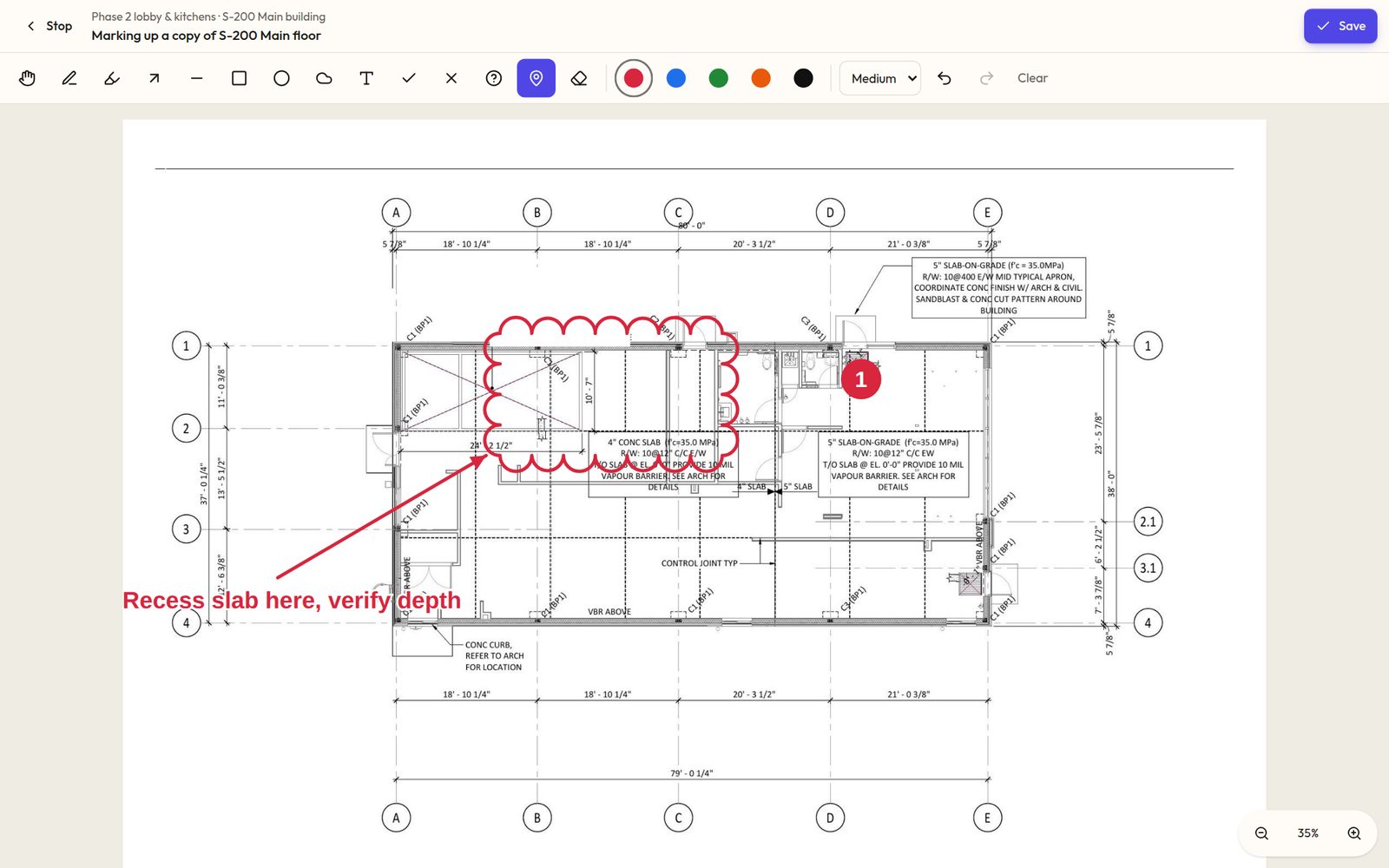
Clouds, arrows, pins and notes, drawn on a copy of the sheet.
The problem: the crew is working from the wrong drawing
Plans arrive by email as huge PDFs that phones struggle to open. Revisions go out and old copies stay in trucks, and marked-up changes live on paper nobody else sees.
How Synhelm handles it
Upload the full PDF set once. Each page becomes its own sheet, named from the title block, kept up to 3,400 pixels wide so small notes stay readable when you zoom.
Upload a new revision and it becomes current; older ones stay readable, and Compare shows what changed in red. Markups are drawn on a copy of the sheet and saved under it.
What you get
Full PDF sets
Every page becomes a sheet, numbered from the title block.
Sheets and zoom
Flip between sheets, pinch and zoom on any phone.
Revisions and compare
The newest revision is current; Compare shows changes in red.
Markups
Clouds, arrows, boxes, text, pins and checks on a copy of the sheet.
Share
Post a markup in the job chat or email it from your business.
Crew access
Crew on the job read the plans; you choose who may mark them up.
Offline
Save the current sheets on the phone for sites with no signal.
Who it's for: General contractors, electricians, plumbers, HVAC, framing and concrete crews who build from drawings.
Questions
- Can the crew see the plans?
- Yes. Crew assigned to the job can read the plans on their phone. You choose which crew members may mark them up.
- Does it do takeoffs or measurements?
- No. The reader is for reading, comparing and marking up drawings; Synhelm doesn't measure quantities from plans.
- Can I turn it off if I don't use drawings?
- Yes. Turn Blueprints off in Settings and it leaves your menu.
How it connects to the rest of Synhelm
One job, everything attached. Each part below works on the same job.
Built because we needed it. Now it's yours.
Set up your shop in a few minutes. Add your logo, your crew, and your first job — the rest follows the job.